Field Analysis for ServiceNow - Clarity. Cleanup. Adoption Signals.
Field Analysis for ServiceNow - Clarity. Cleanup. Adoption Signals.
Know what’s used, what’s forgotten, and what it means for your platform — from cleanup priorities to product adoption insights.
Know what’s used, what’s forgotten, and what it means for your platform — from cleanup priorities to product adoption insights.
Platform Owners
Platform Owners
Monitor field sprawl, reduce maintenance, and optimize your data model over time. See where product features are being adopted based on usage signals.
Monitor field sprawl, reduce maintenance, and optimize your data model over time. See where product features are being adopted based on usage signals.
Architects
Architects
Plan deprecations, drive instance hygiene, and align to platform design principles.
Plan deprecations, drive instance hygiene, and align to platform design principles.
Business Analysts
Business Analysts
Quickly assess which fields are relevant to the business — and which ones aren’t. Understand whether the solutions you’ve rolled out are truly being used.
Quickly assess which fields are relevant to the business — and which ones aren’t. Understand whether the solutions you’ve rolled out are truly being used.
Your Custom Fields Are Slowing You Down
Your Custom Fields Are Slowing You Down
Unused or outdated fields clutter your instance, slow performance, and hide risks — unless you make them visible
Unused or outdated fields clutter your instance, slow performance, and hide risks — unless you make them visible
Over time, ServiceNow instances accumulate unused, outdated, or redundant fields — leading to:
Over time, ServiceNow instances accumulate unused, outdated, or redundant fields — leading to:
Slower performance
Slower performance
Slower performance
Form and table clutter
Form and table clutter
Form and table clutter
Increased technical debt
Increased technical debt
Increased technical debt
Compliance and data privacy risks
Compliance and data privacy risks
Compliance and data privacy risks
Most teams don’t even know what’s being used — or not. Field Analysis gives you that visibility, instantly. → And if fields are being used consistently, that’s a signal your teams are adopting the product as designed. It’s not just cleanup — it’s a pulse on adoption.
Most teams don’t even know what’s being used — or not. Field Analysis gives you that visibility, instantly. → And if fields are being used consistently, that’s a signal your teams are adopting the product as designed. It’s not just cleanup — it’s a pulse on adoption.
What You Gain with Field Analysis
What You Gain with Field Analysis
Beyond cleanup — uncover usage patterns, spot legacy risk, and validate adoption.
Beyond cleanup — uncover usage patterns, spot legacy risk, and validate adoption.
Underutilized Field Detection
Underutilized Field Detection
Flag fields below your usage threshold — e.g., fields populated <10% across records.
Flag fields below your usage threshold — e.g., fields populated <10% across records.
Legacy Fields Report
Legacy Fields Report
Identify custom fields not updated in 90, 180, or 365+ days — sorted by risk or table.
Identify custom fields not updated in 90, 180, or 365+ days — sorted by risk or table.
Dashboard Insights
Dashboard Insights
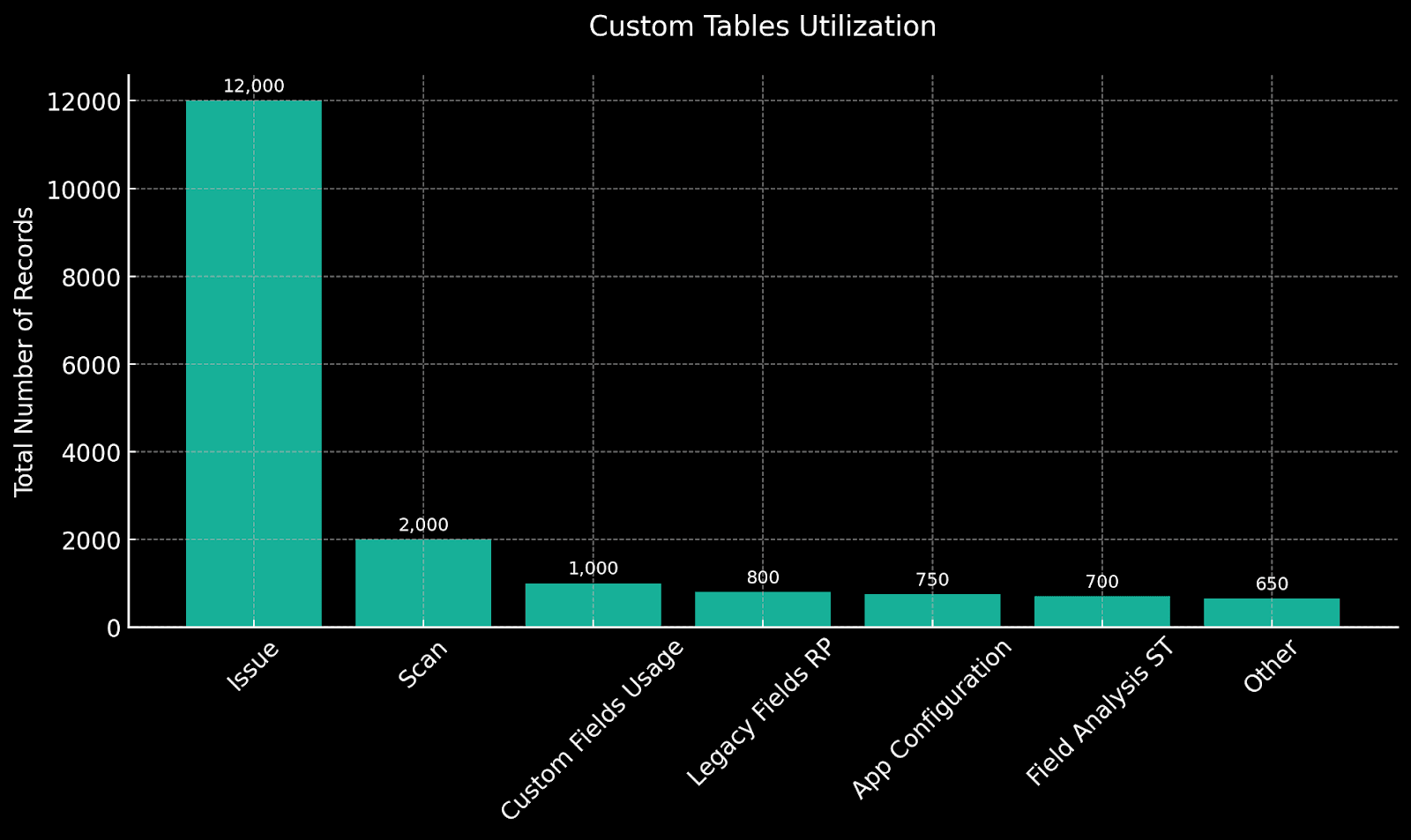
Visualize utilization by table, type, or last update. Compare environments or modules.
Visualize utilization by table, type, or last update. Compare environments or modules.
Cleanup Decision Support
Cleanup Decision Support
Give business analysts and architects a clear roadmap of what to retire, merge, or fix.
Give business analysts and architects a clear roadmap of what to retire, merge, or fix.
From Scan to Decision in Minutes
From Scan to Decision in Minutes
No agents. No downtime. Just fast answers to complex field usage questions.
No agents. No downtime. Just fast answers to complex field usage questions.
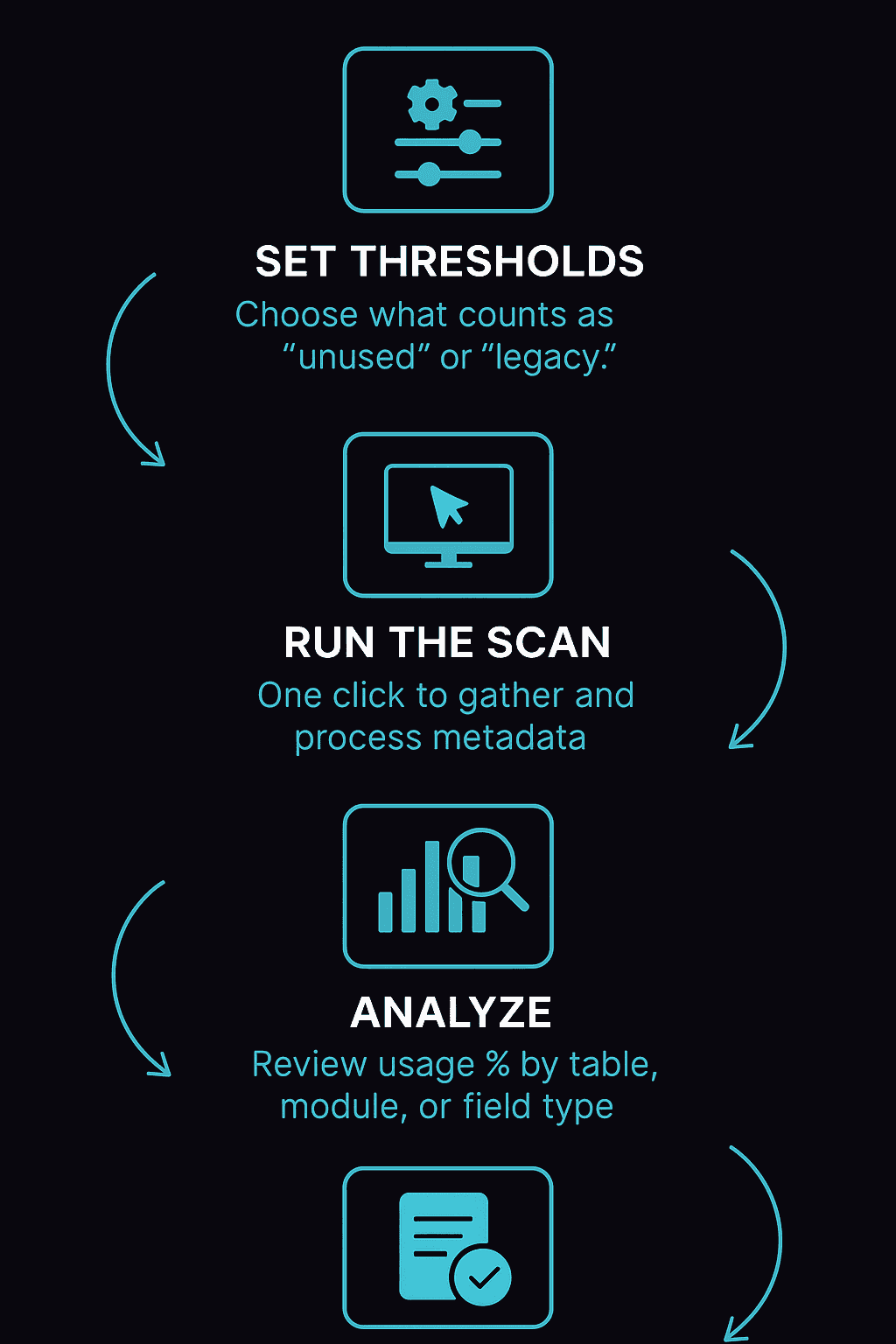
1.Set Thresholds
1.Set Thresholds
Choose what counts as “unused” or “legacy”.
Choose what counts as “unused” or “legacy”.
2.Run the Scan:
2.Run the Scan:
One click to gather and process metadata.
One click to gather and process metadata.
3.Analyze:
3.Analyze:
Review usage % by table, module, or field type.
Review usage % by table, module, or field type.
4.Act
4.Act
Export, prioritize, and clean up with confidence.
Export, prioritize, and clean up with confidence.