Article
Jun 2, 2025
Code Analysis Is Dead. Meet the Future: Quality Center
This blog introduces Quality Center, a platform-native solution for ServiceNow and Salesforce that brings real-time quality intelligence directly into the developer workflow. It explains how features like QC Livecheck, AI-powered QC Copilot, and best practice dashboards help pro and low-code developers build faster and smarter—while reducing technical debt and maintaining consistent standards. Readers will learn how Quality Center centralizes quality insights, streamlines reviews, and empowers teams to deliver cleaner, more reliable implementations with confidence.
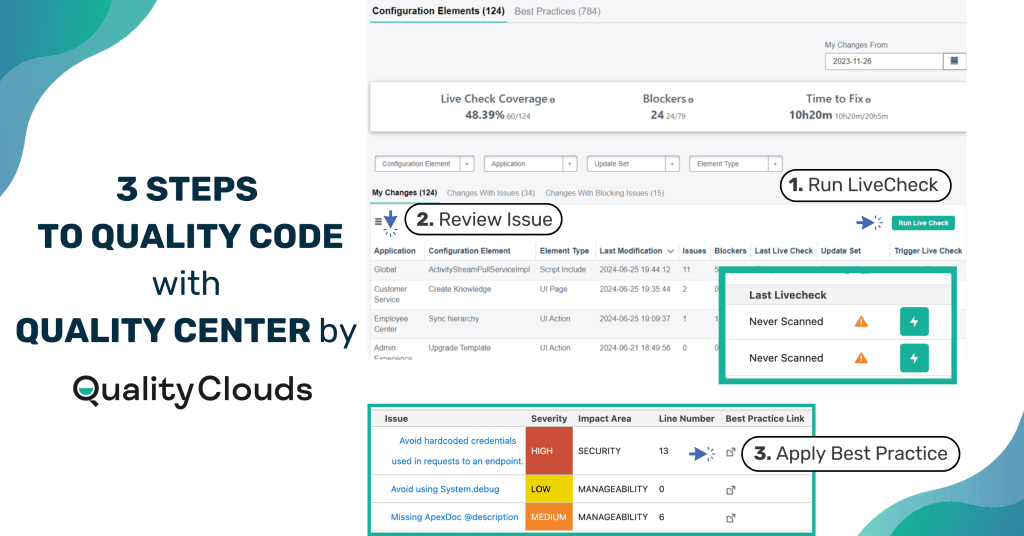
In today's fast-paced ServiceNow and Salesforce environments, speed and innovation often come at the cost of control and consistency. Quality Center flips that script by embedding real-time quality intelligence directly into your platform workflows, so you can scale development without losing sight of standards.
In this blog you’ll learn:
How Quality Center empowers pro and low-code developers to build with confidence
How features like QC Livecheck, AI-powered QC Copilot, and actionable best practice dashboards create a unified, developer-centric hub for continuous quality control.
This blog is for platform developers, team leads, and admins who want to build smarter and faster—leveraging platform-native tools to reduce technical debt, streamline reviews, and stay aligned with best practices.
Unlock Platform Excellence with Quality Clouds
Discover how our solutions empower ServiceNow and Salesforce teams to work smarter, reduce risk, and scale innovation with confidence.
Let's talk Quality!
What is Quality Center?
Quality Center is a powerful tool seamlessly integrated into your ServiceNow or Salesforce platform, designed to help developers monitor and enhance the quality of their changes. It provides comprehensive metrics, actionable insights, and tools to assess quality against established best practices.
Whether working individually or collaborating with teams, you can leverage Quality Center to ensure your implementations meet organizational standards.
Curious to see how it works?
Key Features of Quality Center
My Changes Tab: Your Personal Development Dashboard
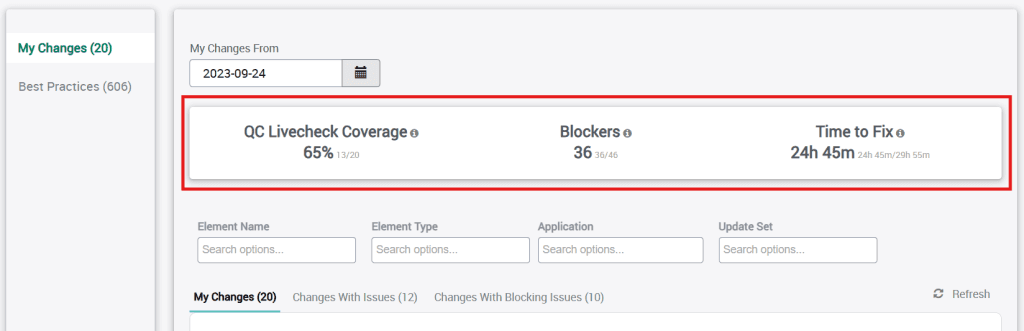
The My Changes tab offers you a personalized view of all configuration elements you’ve modified after a selected date. This feature provides immediate visibility into your recent work and its quality status.
Essential Metrics at a Glance:
QC Livecheck Coverage: Shows the percentage of modified elements that have undergone quality assessment through QC Livecheck scans.
Blockers: Highlights the number of critical issues that are failing quality gates.
Time to Fix: Provides an estimated time required to resolve blocking issues, helping with resource planning.
The My Changes section is further organized into three valuable views:
All Changes: A comprehensive list of all modified elements
Changes with Issues: A focused view of elements that have identified quality concerns
Changes with Blocking Issues: A critical view highlighting elements with blocking issues that must be addressed before deployment.
This organization allows you to quickly prioritize their quality improvement efforts and focus on the most critical issues first.
Learn more about Quality Center for Salesforce—your free toolkit for cleaner, faster builds
Click Here
QC Livecheck: Real-time Quality Assessment
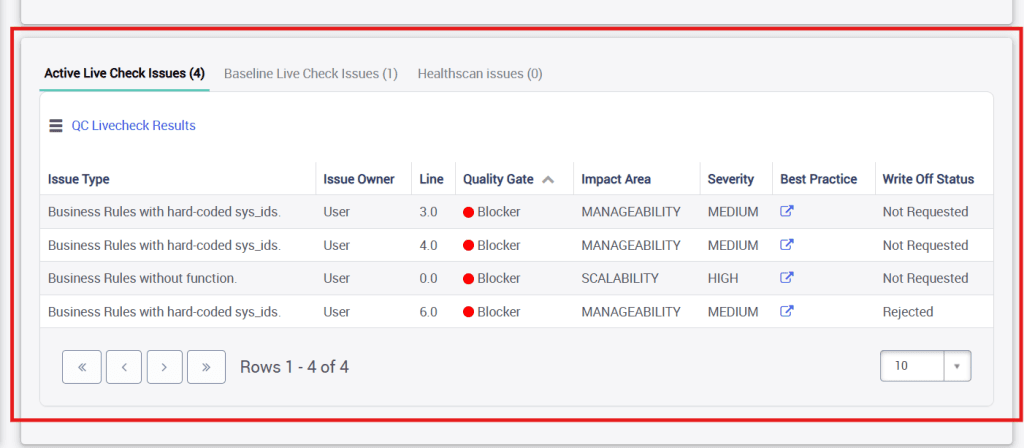
Quality Center's LiveCheck is embedded into Quality Center, allowing you to scan elements—individually or in bulk—to identify potential issues before they impact the broader system. For each element with a valid QC Livecheck, a detailed list displays:
Active QC Livecheck issues: Current issues requiring attention
Baseline QC Livecheck issues: Previously identified issues that were written off
HealthScan Issues: Findings imported from ServiceNow's native HealthScan tool
Each issue includes critical information such as:
Severity (High, Medium, Low, Warning)
Impact Area (Security, Manageability, Scalability, Performance)
Line number location
Quality Gate categorization (Blockers, Minors, Legacy)
Write-Off Status
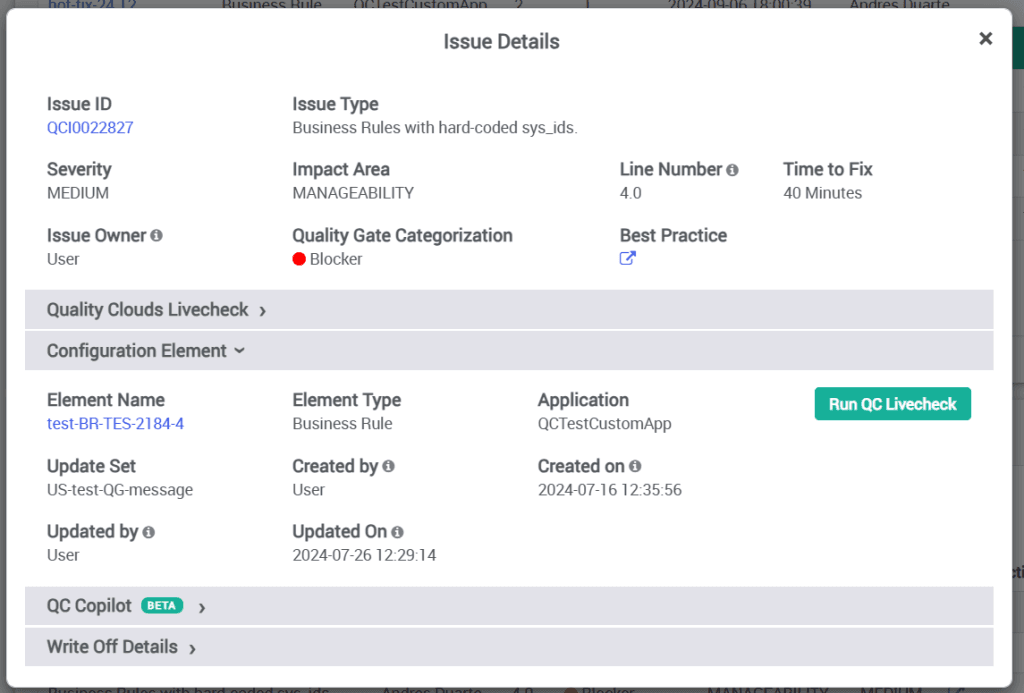
When you click on an individual issue, a pop-up provides comprehensive information organized into several sections:
Issue Details: A thorough explanation of the problem, its impact, and quality gate implications
Quality Clouds Livecheck: Information about the scan that identified the issue
Configuration Element Information: Context about where the issue was found
Write-Off Details: Options to request exceptions with appropriate justification
QC Copilot: AI-Powered Issue Resolution
One of the most innovative features of Quality Center is QC Copilot (available as an add-on). This AI-powered assistant can generate recommended fixes for identified issues, accelerating the resolution process. When QC Copilot generates a solution, it provides:
A detailed explanation of the issue and its cause
Specific code recommendations to resolve the problem
A "Compare Code" feature to visualize the differences between original and recommended code
This AI-assisted approach not only speeds up resolution but also serves as a learning tool, helping developers understand best practices through practical examples.
Best Practices Tab: Proactive Quality Improvement
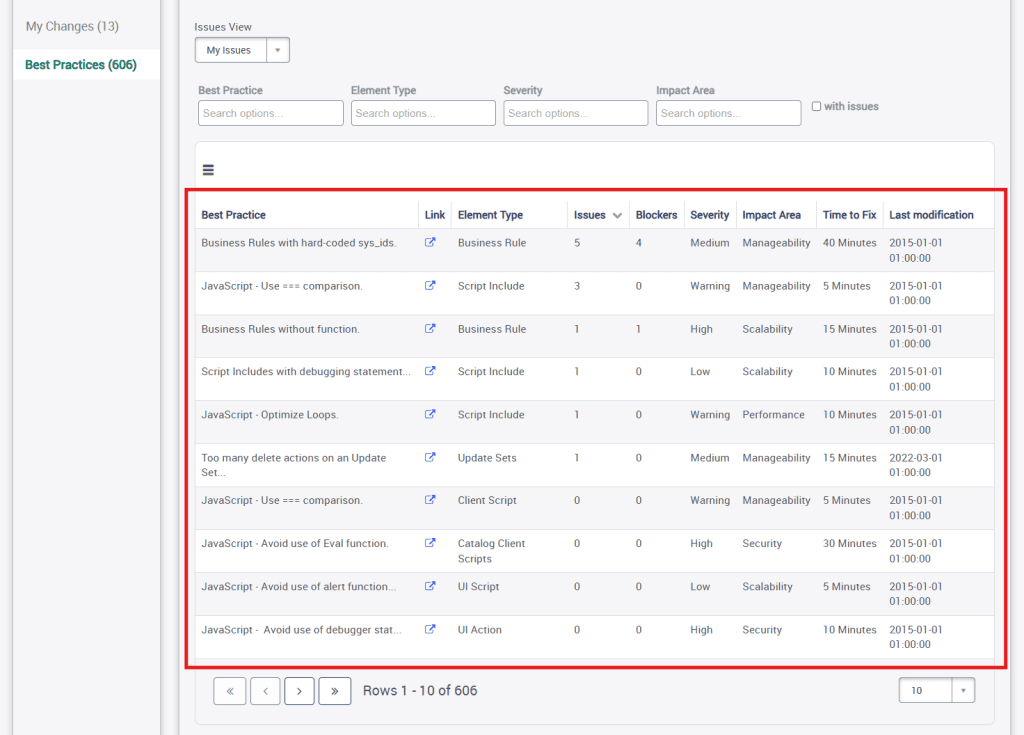
While the My Changes tab helps manage existing issues, the Best Practices tab takes a proactive approach to quality management. It provides a comprehensive list of all active best practices (rulesets) within the organization, ranked by the frequency of associated issues.
This section serves multiple purposes:
Learning resource: Helps developers understand common pitfalls
Proactive guidance: Enables developers to anticipate and avoid issues before they occur
Trend identification: Highlights systemic issues being created across the codebase
Each best practice entry includes:
Link to detailed documentation
Associated element type
Count of related issues and blockers
Severity and impact area classifications
Estimated time to fix
Last modification date of the rule
The related list for each best practice provides specific instances where issues were found, allowing for quick navigation to problematic elements.
Curious how a top research hospital saved over 21,000 DevOps hours?
Quality Center vs. Traditional Static Code Analyzers
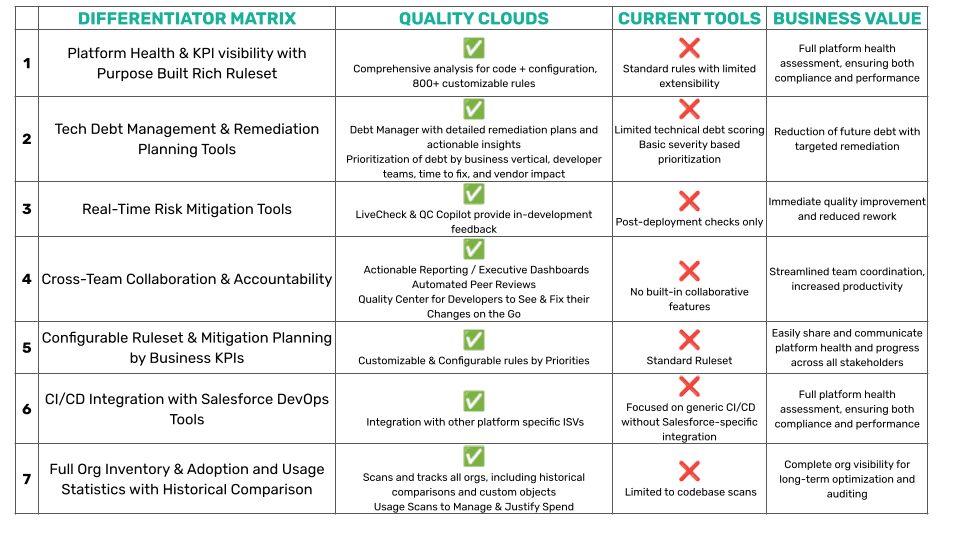
While Quality Center shares some similarities with general-purpose static code analyzers, it offers several key differentiators specifically designed for ServiceNow and Salesforce development:
Platform-Specific Intelligence
Unlike generic code analyzers, Quality Center is:
Natively integration: Built directly into the platform, eliminating the need for external tools
Platform-aware: Understands ServiceNow and Salesforce-specific configurations, patterns, and best practices
Contextually intelligent: Analyzes not just script code but also other platform configuration elements such as flows, objects.
Developer-centric workflow: Organizes issues by developer's changes rather than just by project or repository
Platform-optimized quality gates: Tailored specifically to platorm development patterns
Instance-aware context: Understands the relationship between code and platform functionality
Direct Integration with Platform Development Flow
Unlike external tools that require context-switching, Quality Center:
Lives where developers work: Integrated directly into the platform interfaces on ServiceNow and Salesforce.
Ties to update sets and applications: Connects quality issues to specific update sets and scoped apps for deployment control
Integrates with Platform workflow: Aligns with existing approval and review processes
Developer-Centric Approach
While tools like SonarQube often focus on project-level quality, Quality Center takes a developer-centric approach:
My Changes view: Focuses specifically on what individual developers have modified
AI-powered solutions: Offers QC Copilot to suggest fixes specific to platform patterns
Write-off workflow: Provides platform native exception handling for special cases
Unified Quality Hub
Quality Center serves as a unified hub for all quality concerns:
Multiple analysis sources: Combines QC Livecheck, Peer Review, and HealthScan findings
Single developer dashboard: Consolidates all quality metrics in one location
Platform-native reporting: Generates reports within the platform without external dashboards
This platform-specific focus makes Quality Center more immediately valuable for ServiceNow and Salesforce developers than generic code analysis tools, which typically require significant customization to provide similar platform-specific insights.
Exploring AI for your platform? Quality Clouds helps you adopt copilots and agentic systems safely—with full control and governance 👉🏼 ask us how.
Practical Applications of Quality Center
For Individual Developers
Quality Center empowers individual developers to:
Track and manage their recent changes
Identify quality issues before code review
Learn best practices through real-world examples
Leverage AI-assisted issue resolution
Build a stronger understanding of organizational quality standards
For Development Teams
For teams, Quality Center facilitates:
Consistent quality standards across all developers
Visibility into common issues affecting multiple team members
More efficient code reviews with pre-identified concerns
Reduced technical debt through proactive quality management
Data-driven decisions about quality improvement initiatives
Best Practices for Using Quality Center
To get the most from Quality Center, consider these recommendations:
Make QC Livecheck Part of Your Routine: Run scans regularly, not just before committing code
Address Blockers Immediately: Focus first on issues that could prevent deployment
Leverage the Best Practices Tab as a Learning Tool: Regularly review common issues to improve your development approach
Use QC Copilot for Efficiency and Learning: Even experienced developers can benefit from AI-suggested solutions
Export Data for Team Reviews: Use the export features (PDF, Excel, CSV) to facilitate team discussions about quality trends
Discover how Quality Center simplifies quality in ServiceNow—built for devs, trusted by platforms. Click Here
Conclusion
Quality Center represents a significant advancement in platform governance and quality management. By providing developers with immediate feedback, actionable insights, and AI-assisted resolution, it transforms quality management from a bottleneck into a value-adding process.
Whether you're a single developer looking to improve your code quality or a platform owner establishing governance across a large team, Quality Center offers the tools needed to ensure your implementation remains clean, efficient, and aligned with best practices.
By investing time in understanding and leveraging Quality Center's capabilities, organizations can reduce technical debt, improve platform performance, and ultimately deliver better experiences to their users.
Let's Start the Conversation
Get expert guidance on how to de-risk your platform. Strengthen platform health and standardize quality company-wide.
Click Here.