
ServiceNow
How to set up a ServiceNow CI/CD environment
Learn how to build a world-class ServiceNow CI/CD pipeline — from scoped apps and Git integration to AI-aware quality gates, shift-left governance, and DORA-level deployment metrics.

Beyond Update Sets: The Modern Pipeline
For years, ServiceNow development operated as an island. While the rest of the software world moved to Git, automated pipelines, and containerisation, ServiceNow developers were manually promoting Update Sets and hoping nothing broke in production.
The ServiceNow CI/CD API and App Engine Studio (AES) changed that. But having a pipeline isn't enough. To hit Elite DORA metrics — high deployment frequency, short lead times, low change failure rates — you need a governance layer that scales with your team and with AI-generated code.
This guide covers how to build that end-to-end: scoped apps, pipeline architecture, shift-left quality, AI-aware code analysis, natural language rule building, and automated quality gates.
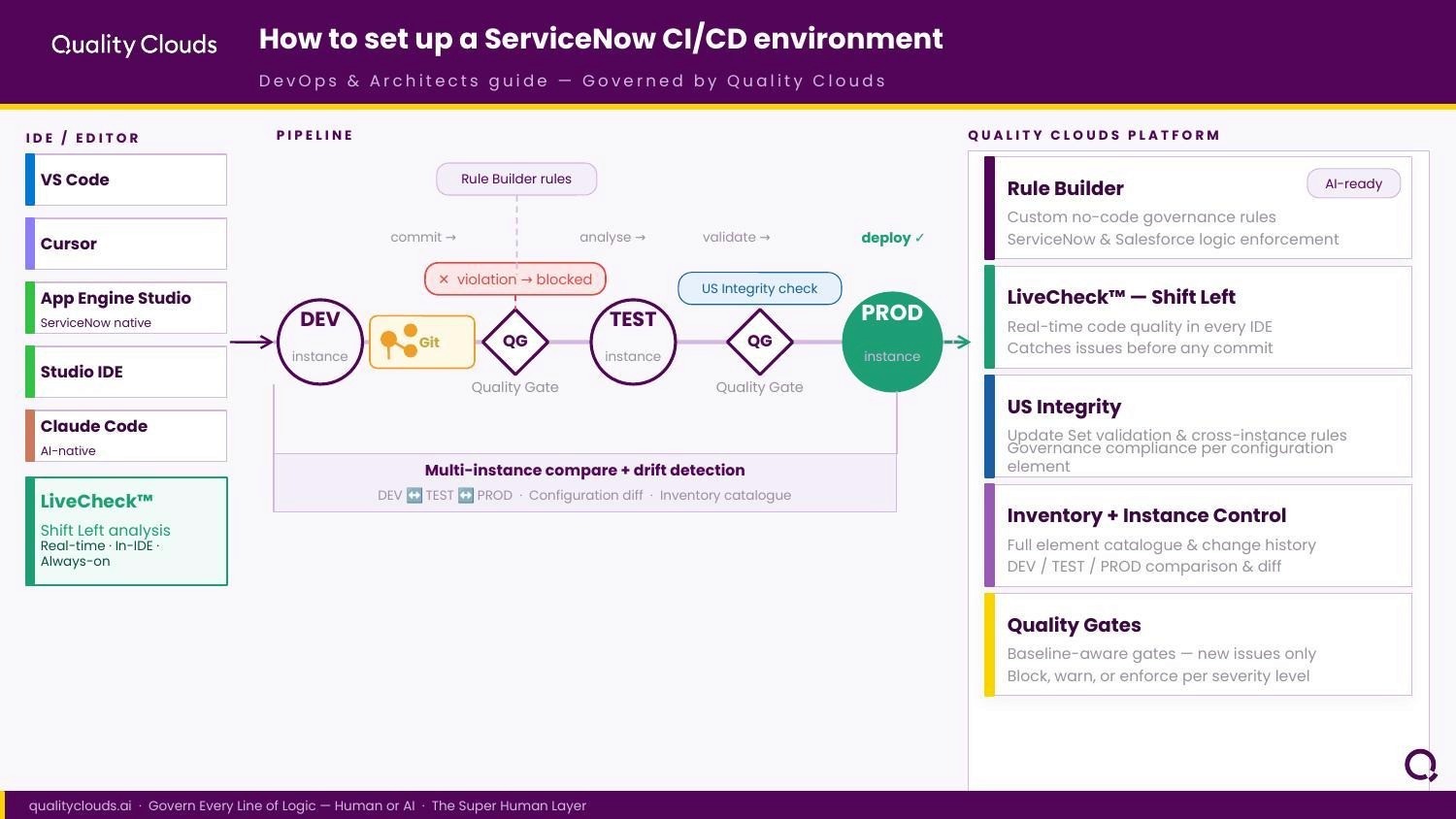
The Quality Clouds CI/CD architecture: IDE-level Shift Left analysis through automated Quality Gates at every environment boundary.
1. Why Scoped Applications Are the Foundation
Moving from Global development to Scoped Applications isn't just a preference — it's the architectural prerequisite for any real CI/CD implementation.
Scoped apps give each application a private namespace. That isolation enables three things that CI/CD depends on:
Collision avoidance: Two developers can work on separate apps without touching the same sys_script record.
Granular versioning: You version your app (e.g. v1.2.0) independently of the platform release.
API security: You control exactly which parts of your app are exposed to the rest of the system.
Once you're working in scoped apps, you can link each one to a Git repository (GitHub, GitLab, Bitbucket) via App Engine Studio. Every commit, branch, and merge can then be used to trigger automated pipeline actions.
→ Need help transitioning to scoped apps? Request a Free Consultation
2. The Pipeline Architecture
A professional ServiceNow CI/CD environment isn't just a Git connection — it's an ecosystem. The backbone is the ServiceNow CI/CD Spokes in IntegrationHub, which allow external tools (Jenkins, Azure DevOps, GitHub Actions) to communicate with your instances: triggering installs, running ATF tests, and publishing versions without any human clicking Commit.
A complete pipeline covers:
Source Control integration via App Engine Studio
Branch strategy (feature branches → main → production)
Automated Test Framework (ATF) triggered on every pull request
Quality Gates that block merges when new high-severity issues are detected
Dashboard visibility into Technical Debt Ratio across all applications
The result: deployment pipelines that run from development to production automatically, with quality enforced at every step — not bolted on at the end.
3. Shift Left: Quality at the IDE, not as an afterthought
In traditional workflows, quality is a phase that happens after deployment. A developer builds, deploys to Test, and then — sometimes days later — a tester fi11nds a problem. The developer has to context-switch back to work they've already mentally closed.
Shift Left means moving quality checks to the very start of the lifecycle: the IDE, the moment code is written.
Universal IDE Support
Whether a developer works in ServiceNow Studio, the ServiceNow SDK (pro-code native, VS Code in the web), Local VS Code with SN Utils, or AI-native environments like Claude Code and Cursor, the environment should be quality-aware. Quality Clouds Livecheck integrates across all of them.
With Livecheck embedded in the IDE, the system flags a GlideRecord in a loop or a hardcoded SysID the moment the developer hits Ctrl+S — before it ever reaches a branch, let alone production.
4. Livecheck vs. LivecheckAI: Two Different Problems
We're now in the era of AI-assisted ServiceNow development. Tools like Now Assist, GitHub Copilot, and ChatGPT are generating scripts at a speed no human team can review manually. AI-generated code introduces a different failure mode than human code — and requires a different guard.
Livecheck (the human guard)
Human developers make lazy or legacy mistakes: using deprecated APIs like gs.log(), forgetting null checks, writing client-side code that uses server side APIs. Livecheck acts as real-time peer review against 100+ best practice rules defined by your organisation.
LivecheckAI (the AI guard)
AI doesn't get lazy. But it hallucinates. It may suggest a method that exists in standard JavaScript but is unsupported in the ServiceNow Scoped Sandbox. It may write code that is syntactically correct but architecturally dangerous — a recursive loop that causes an outage. It may propose security-vulnerable patterns trained from outdated public forums.
LivecheckAI specifically parses AI-generated snippets to verify they are ServiceNow-native and safe before they are executed in any sub-production environment.
With AI coding tools now mainstream on ServiceNow teams, LivecheckAI isn't optional — it's the difference between fast delivery and a platform incident.
5. Rule Builder: Governance in Natural Language
Standard best practices are a baseline. Every enterprise has its own architectural guidelines and development best practices. — Historically, enforcing a custom rule required writing complex Regex or custom JavaScript probes. That kept governance in the hands of developers, not the platform owners who actually defined the policy.
The Quality Clouds Rule Builder removes that barrier. Platform owners describe a requirement in plain English, and the engine builds the logic:
"Flag any Client Script that uses window or document objects."
"Ensure all Business Rules on the Incident table have a Description field populated."
"Prohibit the use of gs.sleep() in any production-bound code."
Governance leads can now own their rules directly, without writing a single line of code. Faster policy iteration, better alignment with compliance, no manual overhead.
→ See the Rule Builder in action — join our webinar
6. Automated Quality Gates
Once code passes the shift-left checks at the IDE and is committed to Git, the final enforcement layer is the Quality Gate — an automated judge in your CI/CD pipeline.
Trigger: A developer opens a Pull Request.
Scan: The pipeline triggers a Quality Clouds scan via API.
Analyse: Code is compared against the established baseline.
Go/No-Go: Green = no new high-severity issues, auto-merge proceeds. Red = new issues introduced, pipeline breaks, developer notified with exact line references.
Quality Gates focus on new issues introduced since the baseline — not legacy debt. That keeps code review focused and developers unblocked on existing known issues while preventing any new ones from reaching production.
This is the difference between fixing the leak and mopping the floor.
7. Measuring: Your Technical Debt Dashboard
You can't manage what you can't measure. A mature ServiceNow CI/CD environment surfaces three core metrics:
Total Debt: The estimated time required to fix all current violations across your estate.
Debt Trend: Is your platform getting cleaner or dirtier over time?
Apps with the most breaking changes: Which applications consistently fail Quality Gates and need remediation investment?
With this data, Platform Owners make informed decisions about where to direct developer resources — build new features or pay down the debt that is quietly slowing the system down.
→ Book a demo to see the Quality Clouds Debt Manager dashboard
Frequently Asked Questions
What are DORA metrics?
DORA metrics are four key performance indicators used to measure the efficiency and quality of software development teams. Developed by the DevOps Research and Assessment group, they provide a standardized way to track how quickly and reliably code reaches production.
Deployment Frequency: How often your team successfully releases code to production.
Lead Time for Changes: The time it takes for a code commit to get successfully running in production.
Change Failure Rate: The percentage of deployments that cause a failure in production.
Failed Service Recovery Time: How long it takes the organization to recover from a failure in production.
What is a ServiceNow CI/CD pipeline?
A ServiceNow CI/CD pipeline is an automated workflow that moves code changes from development through testing to production without manual intervention. It typically combines Git source control (via App Engine Studio), automated test execution (via the Automated Test Framework), and quality enforcement (via Quality Gates) to ensure reliable, repeatable deployments.
Do I need scoped applications to use CI/CD in ServiceNow?
Yes. Scoped applications are the architectural prerequisite. Global-scope development doesn't support source control integration in the same way. Moving to scoped apps gives each application a private namespace, enabling independent versioning, collision-free parallel development, and clean pipeline triggers.
What is a Quality Gate in ServiceNow?
A Quality Gate is an automated checkpoint in your CI/CD pipeline that scans newly committed code against a defined baseline. If new high-severity issues are detected — things like GlideRecord usage in Client Scripts, recursive Business Rules, or hardcoded SysIDs — the pipeline breaks and the developer is notified before the code can be merged. Quality Gates focus only on new issues introduced since the baseline, not pre-existing legacy debt.
What is Shift Left in the context of ServiceNow development?
Shift Left means moving quality checks to the earliest possible point in the development lifecycle — the IDE itself, rather than a QA phase after deployment. With Livecheck embedded in ServiceNow Studio, the ServiceNow SDK, or VS Code, developers get real-time feedback on violations the moment they write code, eliminating the context-switching cost of fixing issues days later.
How does AI-generated code affect ServiceNow CI/CD?
AI coding tools (Now Assist, GitHub Copilot, ChatGPT) generate ServiceNow scripts faster than any human review process can keep pace with. AI-generated code introduces different failure modes: methods unsupported in the ServiceNow Scoped Sandbox, architecturally dangerous patterns, and security vulnerabilities sourced from outdated training data. LivecheckAI specifically validates AI-generated snippets for ServiceNow compatibility before they reach any sub-production environment.
What is a Technical Debt Ratio in ServiceNow?
Technical Debt Ratio is a measure of the accumulated quality violations across your ServiceNow estate — expressed as estimated remediation time. Quality Clouds tracks this as a trend over time, showing whether your platform is getting cleaner or dirtier with each development cycle. It helps Platform Owners prioritise: build new features or pay down the debt that is degrading platform performance.
Can non-developers build governance rules for ServiceNow?
Yes, with the Quality Clouds Rule Builder. Governance leads and platform owners can describe requirements in plain English — e.g. 'Flag any Script Include that does not start with a copyright header' — and the engine builds the underlying logic. No Regex, no custom JavaScript probes.
What CI/CD tools integrate with ServiceNow?
ServiceNow CI/CD integrates natively with GitHub, GitLab, Bitbucket, Jenkins, Azure DevOps, and GitHub Actions via IntegrationHub CI/CD Spokes and REST APIs. Quality Clouds connects to these pipelines via API to run scans, evaluate Quality Gates, and return Go/No-Go signals automatically as part of each pull request workflow.
What is Continuous Quality (CQ) in ServiceNow?
Continuous Quality is the practice of embedding quality checks at every stage of the development lifecycle — IDE, commit, pull request, deployment — rather than treating quality as a one-time phase. It combines Livecheck, LivecheckAI, custom Rule Builder governance, and automated Quality Gates into a single loop that prevents technical debt from accumulating in the first place.
The Path to Continuous Quality
Setting up a ServiceNow CI/CD environment is no longer just about the technical plumbing of connecting to Git. It's about building a Continuous Quality loop.
Scoped apps give you the foundation. IntegrationHub spokes give you the automation. Shift Left gives you the speed. LivecheckAI gives you the AI safety net. The Rule Builder gives you custom governance at scale. And Quality Gates give you the final enforcement layer before production.
The goal isn't just to deploy faster. It's to deploy better — every time, regardless of whether the code was written by a human or an AI tool.
→ See how Quality Clouds fits into your pipeline — book a demo